# FPS Setup

{% hint style="warning" %}
**Tip:** If you’re new to CAS, use the **KINEMATION/Shared/Character** humanoid model.
{% endhint %}

## Character

Add your character to the scene, right-click on it and select "KINEMATION/Setup CAS":

<figure><img src="https://1519747473-files.gitbook.io/~/files/v0/b/gitbook-x-prod.appspot.com/o/spaces%2FrZsugF4ifwEvaFE7BvLB%2Fuploads%2F62y6qBtnCu56PQIxgEAc%2Fimage.png?alt=media&#x26;token=e90b0a12-2ce2-4edc-aeb4-80e5120f4db9" alt="" width="417"><figcaption></figcaption></figure>

Select the **FPS** preset:

<figure><img src="https://1519747473-files.gitbook.io/~/files/v0/b/gitbook-x-prod.appspot.com/o/spaces%2FrZsugF4ifwEvaFE7BvLB%2Fuploads%2FoR5sUvXNuOehezKiLfjf%2Fimage.png?alt=media&#x26;token=49ea2132-cc88-4b58-9f44-317e44748008" alt="" width="458"><figcaption><p>FPS preset.</p></figcaption></figure>

{% hint style="info" %}
**Note**: It will only show up if the demo content is installed.
{% endhint %}

Then, follow the setup steps:

<figure><img src="https://1519747473-files.gitbook.io/~/files/v0/b/gitbook-x-prod.appspot.com/o/spaces%2FrZsugF4ifwEvaFE7BvLB%2Fuploads%2FrgbJTmvdAUib6UPQhBY3%2Fimage.png?alt=media&#x26;token=439d6197-44d8-4530-9f32-8ca366754d4c" alt="" width="387"><figcaption><p>FPS Preset.</p></figcaption></figure>

#### 1. Skeleton Type

Select the type of your character model skeleton:

<figure><img src="https://1519747473-files.gitbook.io/~/files/v0/b/gitbook-x-prod.appspot.com/o/spaces%2FrZsugF4ifwEvaFE7BvLB%2Fuploads%2FqWLlU15CHhEFDU1b0Vs3%2Fimage.png?alt=media&#x26;token=8b79b3d4-f1e7-4f84-bd05-1b690bad557b" alt="" width="375"><figcaption><p>Select your skeleton type.</p></figcaption></figure>

CAS supports most popular model types:

* Unreal Mannequin (UE4\&UE5).
* Mixamo
* Character Creator (CC4, CC5)
* Synty

For other models, pick the "Default" option - CAS will try to find bones recursively.

#### 2. Animations

Next, we need to pick Animation Clips for our character:

<figure><img src="https://1519747473-files.gitbook.io/~/files/v0/b/gitbook-x-prod.appspot.com/o/spaces%2FrZsugF4ifwEvaFE7BvLB%2Fuploads%2F3DZZDuFgjHCgHEa4cQYt%2Fimage.png?alt=media&#x26;token=6da06141-7672-4d24-b9a1-83ce6b3ec750" alt="" width="383"><figcaption><p>Assign Animation Clips.</p></figcaption></figure>

**Base Pose** is your character standing idle animation. CAS uses it to compute additive motion in runtime.

**Overlay Pose** is your weapon idle animation. **Overlay Controller** reference can be left empty, we will add it in the next pages.

#### 3. Bones

Finally, we need to assign bone references, so CAS can create Procedural Animation Modifiers:

<figure><img src="https://1519747473-files.gitbook.io/~/files/v0/b/gitbook-x-prod.appspot.com/o/spaces%2FrZsugF4ifwEvaFE7BvLB%2Fuploads%2FeOXx8o0j9CTtmfM5ACfr%2Fimage.png?alt=media&#x26;token=e7abcd24-fb95-4078-9983-1ffc17876a82" alt="" width="383"><figcaption><p>Assign bone references.</p></figcaption></figure>

By default, this window will prompt you to select a Weapon Bone - a special bone in the character skeleton that contains weapon movement. If your model doesn't have such a bone, you can skip this step and apply the preset.

Once all bones are assigned, you can press the "Apply Preset" button.

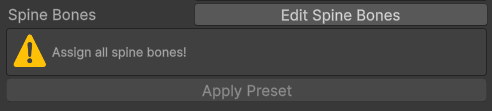
If something is missing, you will see a warning what bones should be assigned manually:

<figure><img src="https://1519747473-files.gitbook.io/~/files/v0/b/gitbook-x-prod.appspot.com/o/spaces%2FrZsugF4ifwEvaFE7BvLB%2Fuploads%2FE3fEKdzK1KvqpKfLoIJu%2Fimage.png?alt=media&#x26;token=25fd813a-8147-4bed-ba59-7d4a3d81a9f4" alt="" width="369"><figcaption><p>Warning example.</p></figcaption></figure>

#### 4. Assign Animator

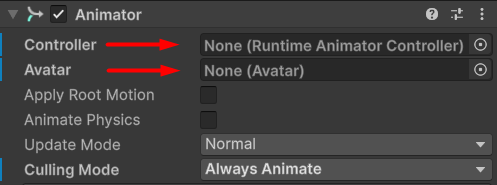
If your character is **Generic**, you will need to assign an Animator Controller:

<figure><img src="https://1519747473-files.gitbook.io/~/files/v0/b/gitbook-x-prod.appspot.com/o/spaces%2FrZsugF4ifwEvaFE7BvLB%2Fuploads%2FYtdrwEvqhem6pbSZnVTm%2Fimage.png?alt=media&#x26;token=17532175-6126-4a0d-b8e7-c84a940a77af" alt="" width="373"><figcaption><p>Assign your Animator Controller here.</p></figcaption></figure>

{% hint style="info" %}
**Tip**: Ensure that the selected animations and Animator are compatible with your skeleton! Generics will only work with Generic animations, and Humanoids - with Humanoid clips.
{% endhint %}